Moving home?
Aussie Broadband makes relocating your internet to a new address simple and easy. We'll take care of the process, so you can be online and ready to connect on the day.

Why choose us?
Australia's Most Trusted Telco
100% Australian-based
On-shore support and sales staff
4.6 stars from 10,000+ reviews
ProductReview, Facebook & Google
How to transfer your internet service
Relocate existing service to a new address
To get started, and verify your Aussie Broadband account.
Have your moving date and your new address ready and follow the steps below to relocate your existing service to a new address.
Enter your new address and begin the checkout process.
On the connection details step, select the date to connect your new service.
Complete checkout and we'll take care of the rest.
Note: We recommend giving our team as much notice as possible. Most connections are quick (around 15 minutes), but new broadband connections (i.e. a new build) may take up to two weeks.
Enter your new service address below to get started:
Your privacy is important to us. Please review our privacy policy (opens in a new tab) to see how we protect your information.
What about hardware?
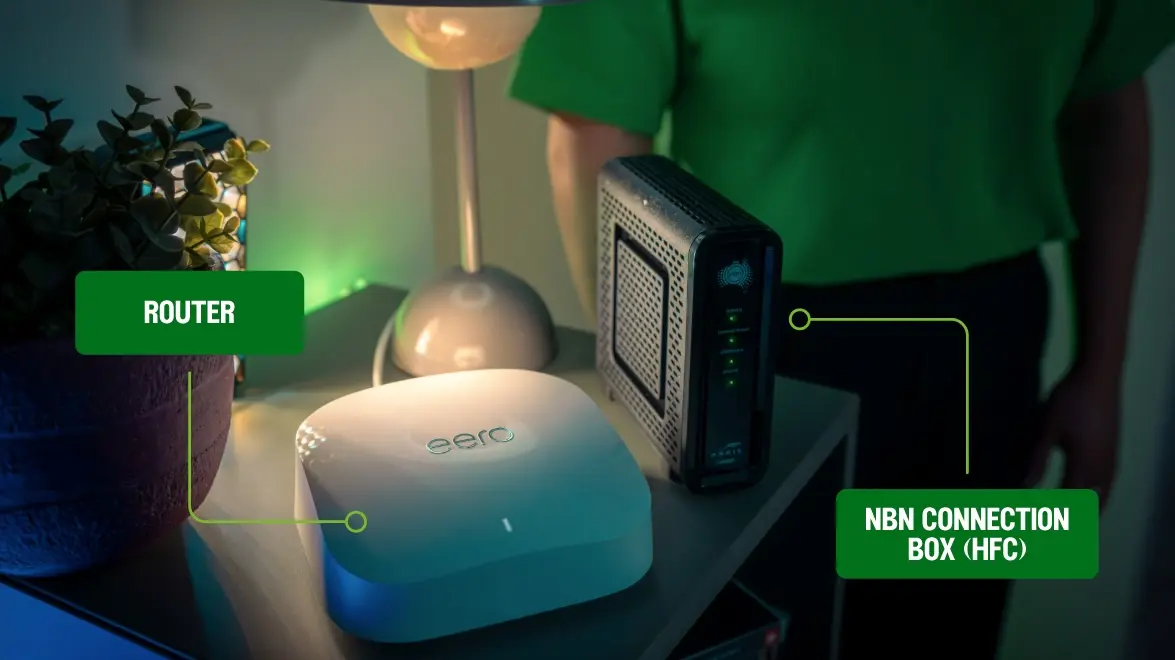
Router / Modem router
To connect to Aussie Broadband, you'll need a compatible router (open in new tab), or modem router (open in new tab). In most cases, you won't need a new device, but if your new home has a different connection type than your old home, or your old provider has locked your device to their network, it might be time for an upgrade. We offer a range of routers and modem routers (open in new tab) for sale that work great with our network.
NBN Connection Box
If your old address has an nbn connection box, don’t take this with you – its settings are locked to your old place and won’t work at your new home. If there isn’t a nbn box at your new home, let us know and we can arrange a replacement.
If you're not sure and need help, speak to our 100% local customer service team via live chat or on 1300 880 905.
We like to move it, move it



Frequently asked questions about moving home
Still unsure? Have a look through our most frequently asked questions, and please don't hesitate to reach out to our friendly support team if you don't see an answer to your question.