First Published Tuesday 21 Oct 2025 | Last Updated Monday 5 Jan 2026 | 3 min read
How to switch internet providers in 5 easy steps
Written by Benjamin Millard, Communications Advisor and Toby Beshara, Communications Officer
While you might have some questions – like, “will my landline be brought over?”, “is my modem locked to my provider?”, or even “can I keep my Wi-Fi name as ‘Wi Believe I Can Fi’?” (always a “Yes!”) – we’ll help you answer these and more in the next 5 steps!
Step 1 – Find a new plan
Knowing how your household uses the internet helps when picking a new plan. If your family games, streams, and does everything in between, a higher speed plan is wise. Live alone or with a partner? Maybe a lower speed is all you need.
Check if you can get an upgrade
While you’re changing plans, it’s worth reviewing what connection type you currently have, and to check if you’re eligible for an upgrade.
If you have a Fibre to the Node, or Fibre to the Curb connections, your address may be eligible for a $0 NBN upgrade to Fibre to the Premises (FTTP). FTTP is more reliable than other connections and you’ll be able to access higher speeds – a lot higher.
To learn more about the different connection types, click here.
Step 2 - Chat to your current provider
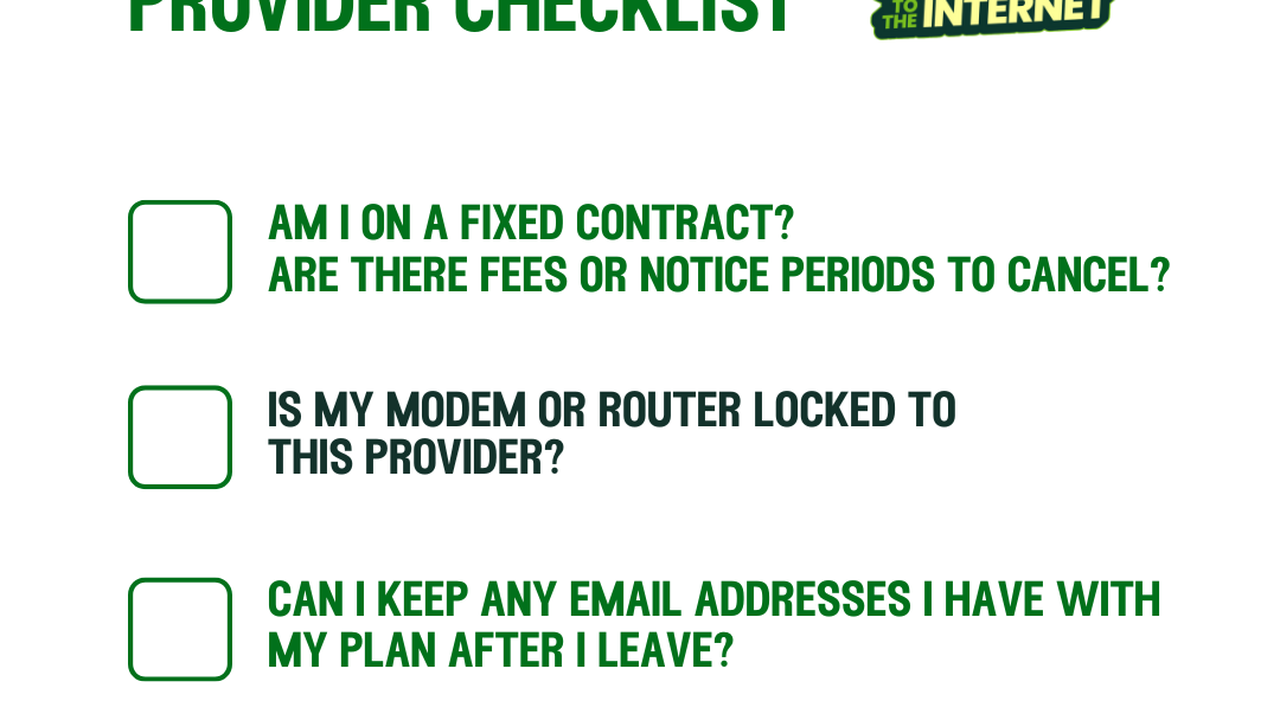
Read your existing contract or ask your provider if you have a lock-in contract.
If you have a while left on your contract, you can often pay to leave early, but this may include an extra fee. Chatting to your provider means you’ll know what financial impact leaving will have.
Some providers need 30 days’ notice before they cancel your service, but this is only for certain providers, so it’s important to ask!
You also want to consider things like whether your hardware is locked with your current provider, or whether your current plan includes things like VoIP or an email address. We’ll go into more detail below!
Step 3 – Check your hardware
Do you need anything new?
If you’re moving to a faster plan, there’s a chance you’ll need a new modem or router. Not all are created equal, so a faster connection needs tech that can handle those speeds.
If you are using your existing devices
Your old modem or router could be locked to the provider you bought it from. A locked device means that it might not work when you try to use it with other providers. This isn’t very common these days, but it’s important to ask your current provider if you’re not sure!
Step 4 – Swap over
Now you can order your new plan and close your old service. Some providers might tell you they can close your old service for you, but it’s always best to check yourself to make sure you don’t get hit with unexpected fees.
AVC ID verification
You’ll need to give your new provider your AVC ID. This is a unique identifying number that identifies your NBN connection.
You’ll need to quote this number to your new provider to authorise a change in your servce. You can find these numbers on your invoice, or in your internet provider’s app or online account.
For more information about finding your AVC number, click here.
Quick list - What to ask your current provider before switching
Step 5 – Wave goodbye to your old ISP
The final step to save you from an unexpected bill is to call your former ISP and say “I’m sorry - it’s not you, it’s me”. Or something less dramatic.
The secret to minimising downtime is waiting to cancel your old service until after your new one is online. If you cancel before your new service is turned on, you run the risk of longer downtime.
This is very important, so we’ll say it again:
Do not close your old service until your new one is ready!
Doing this as soon as your new service is active means you’ll avoid being billed for your old service, because who likes being double-billed?
If you’re wanting to make the move to Aussie, take a peek at our NBN plans here, or call our Sales team on 1300 880 905.
Written by

Benjamin Millard
Communications Advisor
Benjamin (or Ben) is a Communications Advisor at Aussie Broadband. ...
See all articles
Share this post with your mates!
Articles like this
What is CGNAT?
28 April 2022 | 3 min read
Carrier-grade NAT (CGNAT, also known as large-scale NAT), is a method of sharing a single unique public IP address with multiple services to allow providers to…
Tags: Getting started, Hardware
Read more
Moving home? How to easily relocate your internet
3 August 2023 | 5 min read
Whether renting or buying, we get that moving into a new home is stressful. Worse still is collapsing on the new sofa you bought off Facebook Marketplace, only…
Tags: Moving , Internet, Installation
Read more
What is the best internet connection for a small business?
16 March 2023 | 12 min read
Your internet connection can make or break your business in today’s digital-first world. And the grace period of digital adoption is coming to an end. Soon, cu…
Tags: Getting started, Business, Internet
Read more